To draw a Risk/Reward Calculator:
- Click on the Risk/Reward Calculator on the Financial Toolbox.
- Left click at the beginning of your technical formation,
highlighting in red the area between your initial order and your
risking stop loss order.
- This will automatically create an equal sized reward area in
green, which can then be stretched to the proper distance you expect
the graph to retrace. Note the numbers in the tool indicate
the dollar amount of risk and reward.
- When the chart is trading between the red area, you are risking
your own money. When the chart is trading between the green
areas, you are risking OPM or Other People's Money.
- Use the Risk/Reward Calculator on all trades to calculate where
your order entries and exits should be placed.
Resizing the Risk/Reward Calculator:
- Select the calculator by clicking on it.
Note: The calculator is selected when boxes
appear on the corners.
- Click on one of the boxes to drag the select point and release
the mouse button.
Moving the Risk/Reward Calculator:
Select the calculator by clicking on it
continue holding down the mouse button, drag to the new
location and release the mouse button.
Deleting
the
Risk/Reward Calculator:
Select the calculator by clicking on it and press the
delete key on your keyboard to remove.
Changing the Properties of a Risk/Reward
Calculator:
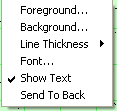
- Right-Click on the drawing to view the properties menu. (see
below)
- Properties that can be changed are:
- Settings: The settings window allows users to adjust the end points
and make their calculations
more accurate. Click on OK to make the change or Cancel to exit
this window.
- Foreground: Changes the line color of the
Risk/Reward Calculator.
- Line Thickness: Changes the thickness of the
Risk/Reward line.
Choose values from 1-6.
- Line Style: Changes The line style of the
Risk/Reward Calculator line.
Choose from solid, dashed, dotted and more.
- Font: Changes the Font, Size, Style, and Color of the values.
- Show Text: Deselect\Select to view or hide the values.
- Send to back: Changes the layer of the tool. This option is
used when more than one tool is in the same area of the chart. Click
on Send to Back when you need to access a tool under the
Risk/Reward Calculator.
|